Client Support: (866) 437-6325
Sales Inquiries: (855) 788-4805

INTRODUCTION
We’d like to begin by acknowledging one undeniable truth: no one likes IT policies – they’re boring, technical, and take some work to understand and implement.
However, creating a solid set of rules and training team members to follow basic best practices when using any company network or device is a necessary “growing pain” that all successful small businesses have to go through in order to ensure the integrity of their IT infrastructure and the security of sensitive data.
Our goal is never to impose unnecessary restrictions on Your operations, but to protect your business from unnecessary interruptions, monetary losses and legal liabilities.
In many cases, risks like viruses, data breaches, ransomware attacks, compromised systems – and the resulting losses and liabilities that follow – can be minimized and even prevented when users abide by some basic IT security rules.
In addition, following the best practices described in these Policies ensures that your technology functions as intended – fast, reliable, and supportive of Your operations.
Because a security breach can result in loss of information, damage to critical applications, loss of revenue, massive legal liabilities and damage to the organization’s reputation and public image, it is essential that all personnel who use or access data on Your IT Network (including employees, contractors, consultants, temporary users, and other users/workers who may have access to any account, data or device on the network) follow the requirements of the Policies in this Manual and understand what is required of them in terms of using electronic devices, network resources and company information.
These Policies may be amended and supplemented from time to reflect the latest industry standards, best practices and the newest solutions to the constantly evolving security threats that small businesses face every day. We will notify You of any updates by sending an e-mail with the updated policy to Your Designated IT Contact.
The definitions used in your MSA and/or Client Handbook apply to all capitalized words and phrases used in the Policies in this Manual, unless another definition is specifically provided in the Policy.
ACKNOWLEDGEMENT & RELEASE
While We are experts in cybersecurity, even the most advanced IT firms with the most up to date, cutting-edge technology suite cannot protect a network and its data where users and administrators don’t do their part in following basic security measures and industry best practices. In short, the protection of Your IT Network requires that we all do our part.
The Policies contained in this Manual outline the actions required of You and Your team in order to minimize exposure to common and well-known cybersecurity risks and ensure that Your IT Network functions as intended.
To ensure compliance with these Policies, all of Our clients are encouraged to implement internal systems, procedures and policies that reflect the requirements contained herein, and to require all employees, contractors and other users to review, accept and promise compliance in writing before being granted a device and/or access to any company-owned IT infrastructure/resources.
If You need help creating internal IT policies for Your organization, contact Your Account Manager, who can either give You a quote for this service or refer You to one of Our trusted partners in legal/compliance.
Having all users follow the established industry best practices outlined in this Manual is essential to Our ability to do Our job.
Accordingly, if Your IT Network or any sensitive data is breached, exposed or compromised due to actions that are not in compliance with the Policies in this Manual and/or Your failure to follow Our specific recommendations regarding any hardware, software, security measure, policy or process, You fully accept all risks associated with such actions and agree that We are not liable for any losses or damages that may result.
You agree to release, indemnify and hold Us harmless from and against any and all liabilities, claims, causes of action, lawsuits and/or demands that arise out of or are in any way related, directly or indirectly, to Your decision not to follow the Policies set forth in this Manual, as amended from time to time, and/or Our advice or recommendation with respect to any hardware, software or security solution which We advised you to install, implement, change, replace, upgrade or delete.
In addition, any labor that We perform to mitigate issues resulting from actions that are contrary to Our recommendations and/or the Policies contained in this Manual, is considered to be outside the scope of any Managed Service Plan and is billable according to Our hourly rates set forth in Your MSA.
For example, if a cybersecurity / data breach, data loss or other damage occurs involving any hardware, software or equipment which We recommended to be installed, upgraded or replaced, You accept full responsibility for remediating any such loss, breach or damage, and further accept and agree that any labor performed by Us to repair any damage or otherwise handle any issues associated with such loss, breach or damage will be billable at Our standard hourly rates.
You acknowledge that:
1) You have read and agree to all terms set forth above;
2) You have read and agree to follow and abide by the requirements and recommendations set forth in the Policies in this Manual;
3) You will implement internal/organizational policies and procedures to ensure that all employees, contractors, team members and other authorized users of Your IT Network comply with the Policies in this Manual;
4) You agree to release Dependable Solutions, Inc. from any and all liabilities for losses and damages which arise from or relate to any action not in compliance with the Policies and recommendations contained in this Manual, as detailed herein.
PROHIBITED USES OF YOUR IT NETWORK
Let’s start with the easy stuff – any activities that are illegal under local, state, federal or international law are strictly prohibited. Under no circumstances are You or any of Your personnel authorized to engage in any such illegal activities while using Your IT Network.
In addition, the following activities are strictly prohibited, with no exceptions:
Ä Violations of the rights of any person or entity protected by intellectual property (“IP”) laws of any applicable jurisdiction. IP law includes copyright, trademark, patent, trade secret and similar regulations. This includes but is not limited to:
· The installation, use or distribution of software products and subscriptions without obtaining the appropriate license that allows such activities.
· The use, reproduction and distribution of copyrighted graphics, photographs, written content, music and other copyrighted content for which You or the end user do not have an active license that allows such activities.
Ä Downloading, installing or otherwise introducing malicious software into Your IT Network or server (e.g., viruses, worms, Trojan horses, e-mail bombs, etc.) or engaging in security breaches/disruptions of network communication, unless such activity is a part of the user’s normal job or duty. Examples include, but are not limited to:
· accessing data of which the user is not an intended recipient;
· logging into a server or account that the user is not authorized to access;
· engaging in disruptive activities such as network sniffing, ICMP floods, denial of service, IP spoofing, forged routing information and other similar activities with a malicious purpose;
· engaging in any form of network monitoring that intercepts data not intended for the user;
· circumventing the security, for example the user authentication, of any host, network or account;
· intentionally interfering with or disabling a user's terminal session via any means.
· Disabling or attempting to bypass endpoint protection, Endpoint Protection (EDR/NGAV), or monitoring systems (including EDR, MDR, or SIEM solutions).
Ä Revealing or failing to take reasonable steps to protect passwords as required by the Password Policy. This includes allowing the use/access of accounts by anyone other than the user to whom the password is assigned (unless an exception applies, such as authorized administrative staff acting on behalf of the account owner).
Ä Engaging in any activity that violates the privacy rights of any employee or third party or using Your IT Network to procure or transmit materials violating laws that protect workers in the user's local jurisdiction, such as sexual harassment, non-discrimination, hostile work environment, and other similar regulations.
Ä Altering, modifying, or adding to any component of Your IT Network without Our express written approval. This includes but is not limited to:
· Downloading or installing any unapproved software on any computer or mobile device owned or serviced by Us;
· Altering, disconnecting or moving any hardware owned or serviced by Us without our direction;
· Using or connecting any hardware to Your IT Network without a compatibility review by Us;
· Engaging in any activity that may a) degrade, slow or hinder the performance of any component of Your IT Network; b) deprive an authorized user access to a device or the network; c) circumvent any Policy in this IT Policy Manual;
· Engaging in any activity which We have advised would jeopardize or compromise the safety, security, reliability, speed, or functionality of Your IT Network.
· Downloading or installing any software or tools that reveal passwords and private information, or otherwise exploit any weakness in the security of Your IT Network. This includes any and all spyware, port scanners, password cracking programs, and similar applications.
· Using or connecting to unapproved Artificial Intelligence (AI) or automation platforms (e.g., ChatGPT, Copilot, Gemini, or similar) to process or share company or client data without prior written approval.
ACCOUNT MANAGEMENT, ACCESS & AUTHENTICATION POLICY
Implementing consistent standards for account setup, management, authentication and network access reduces the risk of security incidents and is often required by regulations and third-party agreements.
The purpose of this policy is to outline the steps to ensure that user accounts are properly managed and that all users connecting to Your IT Network are appropriately authenticated.
Account Setup
The following policies apply to account setup:
Þ HR should confirm employee identity, title and job functions (for purpose of determining access limits) for any user to be granted access to Your IT Network.
Þ Accounts must be set up with appropriate login credentials. All user names must use a consistent standard format (i.e., first initial + last name, with additional letters of the first name to be added until a unique username is created should a redundancy arise), and passwords must comply with the Password Policy.
Þ All user accounts should be configured with the most restrictive set of rights, privileges and access permissions required for the performance of the user’s job duties.
Þ All devices connecting to Your IT Network must be configured to request authentication. If authentication cannot occur, then the machine should not be permitted to access the network.
Þ Accounts must be for individual personnel only. Account sharing and group accounts are highly discouraged.
Þ Users must not be given administrator or “root” access unless necessary to perform the functions of their position.
Þ In the event that guests have a legitimate business need to access Your IT Network, temporary guest access may be allowed, provided that a) the request is formally made and approved by a manager with authority to do so; and b) it is specifically limited to only those resources that are required by that guest, and disabled when no longer needed.
Þ All personnel requiring access to highly sensitive, proprietary or confidential information must have an individual account set up with special access permissions. Such accounts may be subject to additional monitoring or auditing at the discretion of the appropriate supervisory or executive team, and/or as required by applicable regulations or third-party agreements.
Þ Users may be granted access only if they acknowledge and accept, in writing, the requirements of all Policies in this IT Policy Manual.
Þ Access to administrative or cloud accounts must use MFA and be logged for auditing.
Account Use & Management
Þ All accounts must have a unique username and password. Shared user accounts (whereby two or more users access Your IT Network under the same credentials) are not permitted.
Þ Passwords for all accounts must comply with ALL requirements of the Password Policy.
Þ Any device/account connecting to the network can have a serious impact on the security of the entire network. Accordingly, users should confirm that their Endpoint Protection (EDR/NGAV) software, as well as other critical software, are always upgraded to the latest versions.
Þ No one is authorized to establish, activate, modify, disable, or remove any user accounts from Your IT Network without Our express written approval.
Þ HR should notify Your internal IT management of all staffing changes, including employee termination, suspension, or a change in job functions, in order to ensure that a) access permissions can be adjusted so that they are always an accurate reflection of the team member’s job requirements; and b) accounts of terminated employees can be disabled, and any devices used by them returned and wiped.
Þ Privileged and service accounts should use unique credentials, monitored regularly, and reviewed at least quarterly.
Monitoring & Restrictions
Þ Inactive accounts should be reviewed for potential disablement or removal every 60 days; accounts should not remain enabled without business justification.
Þ We periodically conduct account audit reviews to ensure that all accounts and network resources are appropriately used and managed.
Þ All businesses should have written policies in place regarding
a) whether users’ access is removed or maintained while on a leave of absence or vacation; and
b) the criteria and process for modifying a user account based on name changes, position changes and permission changes.
Remote Network Access
Remote access to Your IT Network can be provided to users for convenience; however, this carries its own security risks. For that reason, Remote access must require the use of multi-factor authentication (MFA).
In addition, the following requirements apply to all users accessing Your IT Network remotely:
Þ All remote access must be strictly controlled via approved encryption methods (such as VPNs) and strong pass-phrases.
Þ Users must never share their login and password with anyone, including family members.
Þ Before remotely connecting to Your IT Network, users should confirm that the remote host is not connected to any other network at the same time, except personal networks that may be under that user’s or an authorized third party’s complete control.
Þ All devices connected to Your IT Network, remotely or otherwise, must use the most up-to-date endpoint protection software (EDR/NGAV approved by Us.
Þ All Policies in this IT Policy Manual apply to remote users the same way they apply to everyone else.
Failed Logins
Repeated login failures could be a sign of an attempt to “crack” a password to obtain unauthorized access Your IT Network and sensitive data. In order to protect Your business from password-guessing and brute-force attempts, any user account with 7 consecutive failed login attempts will be locked. Depending on Your preference, the lockout may be for a specific amount of time (less secure) or require a manual reset by Us (more secure).
ENDPOINT PROTECTION (EDR/NGAV)
Any IT Network and device connected to the Internet is exposed to security risks that threaten to wipe out data, render devices inoperable, expose sensitive and confidential information, hold data hostage until a ransom is paid, and cause businesses to be exposed to lawsuits, fines and other liabilities.
Common Cybersecurity Threats
Some of the most common cybersecurity threats that affect all businesses include the following:
Malware: Malware is the general collective term used to refer to software specifically designed to damage, disrupt or gain unauthorized access to a computer, system, server or network. It includes viruses, worms, spyware, ransomware and other software/code designed to cause damage to data or gain access to a network. It is usually delivered via email, in the form of a link or file, and is “activated” when the user clicks on the link or opens the file.
Virus: Computer viruses – a type of malicious code or program written to alter the way a computer operates – cause billions of dollars' worth of economic damage each year. Viruses are designed to spread from one computer to another, and have the potential to cause widespread damage to Your IT Network, such as harming the system software by corrupting or destroying data.
Trojan Horse: A Trojan horse is a type of malware that is used by hackers and thieves to gain access to a computer or system. They infect systems by tricking the user into opening the file, which is usually disguised as legitimate software. Once activated, Trojans can enable criminals to spy on you, steal your data, gain access to your system, and otherwise damage, disrupt, and inflict harm upon your data and IT Network.
Worm: A worm is a malicious software that replicates itself and spreads through networks like a virus. They are generally designed to target pre-existing vulnerabilities in the operating system of the computers they attempt to infect in order to steal data, install backdoors that can be used to access the network, and cause other types of harm. Worms consume large amounts of bandwidth and memory, which can lead to networks, devices and servers malfunctioning due to overload. Many of the most destructive types of malware have been worms.
Spyware: Spyware is loosely defined as software with malicious behavior that aims to enter your computer, perform surveillance to gather information about a person or organization, and send such information to another entity so that they may profit from the stolen data. Spyware activity leaves you open to data breaches and associated liabilities, while also slowing down network and device performance.
Adware: Adware refers to unwanted software designed to display advertisements to the user, most often in a web browser. It usually either disguises itself as legitimate software in order to trick the user into installing it, or it may get on a computer by being secretly buried in legitimate software. Once on a device, it engages in unwanted activities such as analyzing the websites visited, displaying burdensome advertisements, and sell your browsing behavior and other information to third parties.
Keyloggers: Keyloggers are a type of monitoring software designed to record every keystroke made by a user on any website or application, and send the information to a third party. Criminals use keyloggers to steal personal, financial and other confidential information such as passwords, banking details, and trade secrets. Some keyloggers can record audio/video, GPS location, and screenshots.
Ransomware: Ransomware is a form of malware that encrypts a victim's critical data, so that the organization cannot access its files, databases, or applications. In order to restore access, the organization must pay the attacker a specified sum. Ransom amounts demanded range from a few hundred dollars to tens of thousands and more. Ransomware often spreads quickly, encrypting files across a network and target database and file servers. It can easily paralyze an entire organization. Due to its effectiveness, it has cost businesses billions of dollars in damages and payments to cybercriminals.
Phishing: Phishing is a type of cyber attack where criminals impersonate legitimate entities (such as banks, government agencies, or businesses) in an attempt to trick individuals into divulging sensitive information, such as passwords, credit card numbers, or social security numbers. This is typically done through deceptive emails, text messages, or phone calls that contain links to fake websites or ask for personal information. The goal of phishing is to steal sensitive information or infect computers with malware, which can be used for financial gain or other malicious purposes.
Steps We Take to Prevent Malware Issues
On every file server and device that We service, We ensure that Endpoint Protection (EDR/NGAV) software and additional cybersecurity tools are installed, actively running, and configured to be automatically updated. We also install e-mail virus protection software to protect each e-mail gateway and continually scan all computer devices for malware. These systems must be managed from a centralized console to ensure visibility of alerts and compliance with patch and update policies. All endpoint protection tools must include behavioral-based detection and ransomware protection capabilities, with centralized alerting and logging for all devices under management.
Once We have installed all required software, altering the settings in any manner is strictly prohibited, as inexperienced users may cause the effectiveness of the software to be reduced or eliminated. Users are specifically prohibited from altering the automatic update frequency of the virus protection software.
If a cyber threat is detected, We may disconnect the infected device(s) from the network to prevent propagation of malware to other devices and resulting damages, until the infection has been removed.
User Requirements
All users must take the following precautionary measures in order to avoid unnecessary business interruptions and monetary losses caused by cyber attacks:
Þ Never open any attachments to any e-mail from an unknown, suspicious, or untrustworthy source. If anyone is unsure about an e-mail, We are always available to take a look and potentially avoid a costly and disruptive security incident.
Þ All SPAM, chain, or other junk mail should be deleted without opening or forwarding.
Þ Users must never download files from the Internet on any work devices unless specifically authorized by Us – especially not from unknown or suspicious sources.
Þ Removable media (such as CDs, USB drives, external hard drives) must always be scanned for viruses before using it.
Þ All data saved to network drives is backed up at regular intervals. Clients who do not save their data to backed up network storage locations should take measures to back up all critical data on a regular basis and store the data in a safe place.
Þ Users are prohibited from disabling, pausing, or modifying endpoint protection or security monitoring tools.
Incident Reporting
If any user detects or suspects a cyber threat, this should be treated as a security incident and must be immediately reported to Us by following the steps in the Security Incident Reporting & Response Policy so that any potential security issues can be mitigated before they have a chance to get out of hand or cause greater damage. If an endpoint is isolated or quarantined due to a detected threat, users must not attempt to reconnect it to the network or transfer files until cleared by Us.
PASSWORD POLICY
Since weak passwords can compromise even the most secure IT networks, this policy is designed to ensure that the passwords used in Your organization are strong, secure, and provide a reasonable level of security for your network without posing an undue burden on users. Strong passwords are the first protection for user accounts and as such, they are a mandatory element of all cybersecurity solutions.
User Account Password Policy
Þ Passwords must be used for all computers connected to Your IT Network.
Þ Passwords must be at least 16 characters in length – typically, the longer the password, the more secure it is.
Þ Passwords must be changed immediately upon evidence or suspicion of compromise, or when otherwise directed by Dependable Solutions.
Þ Passwords must contain a combination of alpha, numeric, and special characters, where the computing system permits (!@#$%^&*_+=?).
Þ Passwords should not contain information such as a name, proper name, acronym, or a dictionary word in any language.
Þ Passwords should never be linked to any personal information about the password owner such as an address or phone number, a birth date, social security number, relatives’ names, etc.
Þ Passwords may not be reused for at least 1 year.
Þ Screensaver passwords are recommended for PCs that are only used by one user, as they increase security by removing the opportunity for an intruder or unauthorized employee to access network resources through an idle computer. Screensaver passwords are not permitted for computers shared by more than one user, as they violate the “no shared passwords” policy.
Þ Multi-Factor Authentication (MFA) must be enabled for all remote access, administrative, and cloud accounts.
System-Level Password Policy
Þ All system-level passwords must be at least 16 characters in length and contain at least 3 of the following: upper case, lower case, numbers, and special characters.
Þ Passwords must be changed at least every 90 days unless the password meets the NIST standards for a less frequent change requirement.
Rules Applicable to All Passwords
Þ The same password should never be used for multiple accounts.
Þ All passwords and authentication credentials (including MFA recovery codes or app-based tokens) are strictly confidential and must not be disclosed to anyone, including co-workers, managers, or family members.
Þ Passwords must never be shared or disclosed on questionnaires or security forms.
Þ Passwords must not be shared via e-mail, instant message, text or any other form of electronic communication without encryption. Because interception of this information can result in a serious security incident, authentication credentials must always be encrypted during transmission across any network.
Þ Users must not use password hints from which a third party may deduce the password (for example, “mother’s name”, “home address”, etc).
Þ Passwords must not be stored physically, such as written down on a notepad or post-it. Passwords may be stored in an approved password manager or a file on a computer system or mobile device (phone, tablet) if they are appropriately encrypted.
Þ Circumventing password entry via auto log-ons, application remembering, embedded scripts, hard coded passwords in client software, or otherwise, is strictly prohibited unless written approval is provided by Us and any additional security measures recommended by Us have been implemented.
Þ Security tokens (such as smartcards, key fobs, etc.) must be immediately returned by any user whose relationship with the business was terminated for any reason.
Þ Passwords should be created as passphrases when possible (a string of random words or phrases) to improve memorability and length.
Password Security Incidents
If there is any reason to believe that the security of an account may be compromised, You must:
1) Notify Us immediately via the methods specified in the Security Incident Reporting & Response Policy
2) Change the password (ensuring that the new password is compliant with the Password Policy)
3) If applicable, take control of and protect/destroy any passwords that may have been found written down or stored electronically without encryption
INTERNET POLICY
General Internet Use & Access Policy
The following policies apply to all users and devices accessing the Internet:
Þ All software by which users access the Internet must be a) part of the Our Standard Technology Suite or otherwise approved by Us; and b) up to date on all upgrades and incorporate all vendor-issued security patches
Þ PCs on Your IT Network may access the Internet only through Internet firewall or equivalent security device approved by Us.
Þ Bypassing any network security requirements outlined in this Policy, by accessing the Internet directly, is strictly prohibited.
Þ Accessing the Internet for the purposes of gaining unauthorized access to local and remote computer systems, software piracy, illegal activities, the transmission of threatening, obscene, or harassing materials, or personal solicitations, is strictly prohibited. Likewise, using the Internet to propagate malware is strictly prohibited.
Þ Downloading or installing any software from the Internet on any device connected to the IT Network without Our express written approval, is strictly prohibited.
Þ Cloud or Software-as-a-Service (SaaS) applications must be reviewed and approved before users upload, store, or share company or client data.
Þ All software and files downloaded from the Internet must be scanned for viruses using the software designated or approved by Us for this purpose. If a virus is detected or suspected, We must be notified immediately so that we can take steps to mitigate any potential threat before it has a chance to cause further damage.
Þ If software is downloaded, it may only be used in conformity with the terms of its license and applicable intellectual property laws.
Þ Users should have no expectation of privacy in anything they create, store, send, or receive using the company’s Internet access.
Þ All confidential and sensitive information transmitted over the Internet or any external network must be encrypted.
Þ Accessing websites containing sexually explicit material or other material deemed inappropriate in the workplace – along with any display, storing, archiving, or editing of such content on any company device – is strictly prohibited. In the event that a user accidentally connects to a prohibited site, the user must immediately disconnect from the site.
Incidental / Personal Use
To minimize security risks, incidental personal use of Internet access (this may include browsing for entertainment, playing games, participating in chat groups, uploading or downloading large files, streaming audio and/or video files, and other non-business purposes) should be restricted to a reasonable minimum, and should only be permitted for company personnel (i.e. it should not extend to family members or other third parties). Storage of personal files and documents within Your IT Network should be nominal.
Personnel should be advised that a) sending or receiving files or documents that may cause legal liability to the business should be strictly prohibited; and b) all files and documents, including personal files and documents, which are stored on Your IT Network are owned by the company and may be subject to open records requests, and may be accessed in accordance with this policy.
Computer resources, network bandwidth and storage capacity are not unlimited. As such, all users should be instructed to refrain from knowingly engaging in activities that waste or unfairly monopolize resources, or which are not essential to the performance of their job duties.
Our Rights
Þ Restricting Access: In order to protect Your data and network, We may restrict access to programs, web apps and websites that harm network performance or which are known or found to be high-risk or compromised by malware. We may, in Our discretion, use technical controls to restrict users’ ability to download and install software.
Þ Monitoring: We may monitor, log, and analyze any and all user activity on Your IT Network. This includes, but is not limited to, monitoring and logging all Internet sites visited by users; social media usage; any chat, newsgroup and forum activities; file downloads and uploads; application usage; and all communications sent and received by users.
Þ We may employ Data Loss Prevention (DLP) and AI-based inspection tools to detect and prevent unauthorized sharing of sensitive or confidential information over the Internet.
SECURITY INCIDENT REPORTING & RESPONSE
When it comes to security breaches – and responding to them – time is of the essence. The longer a cybersecurity incident such as a data breach or exposure goes undetected, the greater the damage such an event can cause.
As such, it is absolutely essential that any individual who finds out or suspects that a security incident has occurred, must immediately contact Us to provide a full description of the events and all available information via the following methods:
E-Mail: [email protected]
Phone: (866-437-6325)
If the primary contacts are unavailable, incidents must still be reported immediately to Dependable Solutions through any available method — no delay is acceptable.
Examples of reportable incidents / suspicious circumstances:
Ä You become aware that a password has been compromised.
Ä You have identified a virus or other malware infection.
Ä A theft, breach or exposure of Your data or IT Network has occurred.
Ä You notice that Your network security or firewall has been uninstalled or disabled; you can’t restart your anti-malware program or firewall and you didn’t turn it off.
Ä You notice an increase in error messages while completing routine tasks.
Ä Computers are freezing, crashing or running slowly for no apparent reason.
Ä E-mails from company addresses are being sent without Your knowledge, You are accused of sending SPAM.
Ä Your Internet browser suddenly displays toolbars and extensions that you don’t recognize.
Ä A password has suddenly changed without Your knowledge.
Ä You notice that files are missing or being deleted from Your network.
Ä You notice files are being re-named.
Ä You receive a ransom demand.
Ä You are unable to access files or applications.
Ä You suspect any cyber threat has occurred.
Ä You detect or suspect unauthorized access to a cloud account (e.g., Microsoft 365, Google Workspace, Azure, AWS, or similar).
Ä You notice that endpoint protection, EDR, or monitoring software has been disabled or tampered with.
Next Steps in Responding to a Security Incident
Once a report is received, We will launch an investigation into the issue to confirm whether a theft, breach or exposure has occurred, and will follow the appropriate response procedure based on those findings. We will take action as outlined in Your Cyber Incident Response Plan.
If a breach has occurred, We may be required by Our insurer and legal team to provide access to forensic investigators and experts tasked with determining the nature and extent of the breach; the data that has been impacted or exposed; the number of individuals and/or organizations affected; and to determine the root cause of the breach or exposure.
We will also work with Your communications, legal, HR and other relevant departments in handling and communicating the events to employees and team members, the public, and any clients, end users and other parties directly affected by the breach.
Dependable Solutions and Partner organizations must comply with all applicable breach notification requirements. Where personal or regulated data may be impacted, notification to affected parties and/or regulatory authorities must occur within the legally mandated timeframe, generally within 72 hours of discovery.
A post-incident review will be conducted following each major event to document root cause, corrective actions, and improvements to security posture.
E-MAIL POLICY
E-mail has inherent security risks, which must be proactively addressed in order to avoid viruses or malicious code disrupting Your IT Network and your ability to do business. The following policies are designed to protect Your business from the most common risks associated with business e-mail use:
E-Mail Security and Monitoring
We have advanced e-mail security systems in place that scan all incoming and outgoing e-mails for spam and malicious code and files/attachments. If an attachment has an extension commonly associated with malware or is otherwise classified as high risk, it will be removed from the e-mail prior to delivery. In addition, e-mails from domains and IP addresses associated with malicious actors will be rejected, and messages identified as spam will be quarantined for the user to review.
All company and hosted e-mail systems must support and enforce SPF, DKIM, and DMARC authentication to prevent domain spoofing and phishing.
Any e-mail account sending out spam will be shut down until You notify us that the issue has been addressed and the account should be reinstated. Likewise, any outgoing e-mail containing attachments with viruses or malicious code will be prevented from sending. Allowing such activities would not only harm the recipient’s system, but may also result in legal liability, regulatory fines and significant damage to Your organization’s reputation.
Diligence in E-mail Communications
All team members should be trained to recognize e-mail phishing and spoofing: the criminal practice of sending e-mails with a forged header that makes it appear as though the message as sent by someone other than the actual sender. The objective is usually to induce the recipient to open the e-mail, and either download a malicious file or inadvertently provide sensitive data or make a fraudulent payment to a criminal.
Employees should be trained to identify spoofed e-mail; should never open or respond to them; and should under no circumstances download any attachments. Users must use caution when opening attachments from unknown senders, as this is how many instances of malware infection occur.
If suspicious e-mail activity has been detected, users should be trained to report it immediately to the appropriate supervisory personnel and You must in turn notify Us immediately so the issue can be addressed.
All employees must complete phishing-awareness or social-engineering training at least annually and after any major incident involving e-mail compromise.
Encrypting and Protecting Sensitive Content
All data sent via e-mail should be treated as sensitive information. Users should never send work documents or information to anyone outside of the company unless it is a required part of business and the contact is known and trusted. Additionally, sensitive information such as passwords, social security numbers, credit card and bank account numbers, pin numbers, and other information from which accounts can be hacked (think mother’s maiden name, etc.) should never be sent without encryption. When data is sent encrypted, passwords to decrypt the data should not be sent via e-mail.
In order to ensure compliance with this policy, all e-mail activity on Your IT Network is subject to monitoring, logging and review.
Because there is nothing we can do to proactively monitor and protect information sent to or from personal accounts, team members should be discouraged from sending, receiving or forwarding confidential or sensitive information via personal e- mail accounts such as Gmail, Hotmail, Yahoo, etc.
Users must also comply with the Personal Device Policy for sending, forwarding, receiving, or storing information relating to your business.
Encrypted e-mail solutions or secure file-transfer services approved by Dependable Solutions should be used when transmitting confidential data externally.
Company E-mail and Personal Business
Just as storage of personal files and documents by employees on Your IT Network should be kept to a minimum, team members should also refrain as much as possible from using company e-mail accounts to send messages and files to family members, personal contacts, or other acquaintances.
Not only do such activities pose a heightened security risk, but it also increases the potential of subjecting Your organization to unnecessary legal liabilities arising from the transmission of files, messages and documents to contacts with no business relationship to your company.
It is also important to note that business e-mail is not private. All e-mails, files, and documents sent through the company network – including personal ones – are typically considered property of the organization, and may be subject to open records and similar requests.
E-Mail Conduct That Can Jeopardize Your Business
In order to protect Your business from unnecessary legal liabilities and damage / interruption to Your e-mail service, the following activities are prohibited:
Ä Using company e-mail to send messages that may be deemed intimidating, harassing, or offensive. This includes, but is not limited to: abusive language, sexually explicit remarks or pictures, profanities, defamatory or discriminatory remarks regarding race, creed, color, sex, age, religion, sexual orientation, national origin, or disability;
Ä Sending SPAM in any form, including unsolicited advertising or "junk mail" to individuals who did not specifically request such material, or creating/forwarding "chain letters" or promoting pyramid/Ponzi schemes;
Ä Sending unsolicited e-mails to large groups, except as may be appropriate in
the ordinary scope of the sender’s job duties;
Ä Knowingly sending or forwarding e-mails containing viruses or malicious code/software;
Ä Excessive use of company e-mail to conduct personal business;
Ä Violating copyright laws by illegally distributing protected works;
Ä Forging or attempting to forge e-mail messages or e-mail header information;
Ä Creating false identities to bypass any laws, regulations or policies;
Ä Using unauthorized e-mail software;
Ä Engaging in any activities for the purpose of circumventing this Policy, such as knowingly disabling the automatic scanning of e-mails for spam content, malicious code and attachments; or otherwise intentionally circumventing any e-mail security measures implemented or recommended by Us;
Ä Sending e-mails revealing any information known by the user to be confidential or proprietary, without specific authorization from the owner of the information;
Ä Sending e-mails that may harm or tarnish the image, reputation and/or goodwill of the organization and/or any of its employees.
Ä Using or connecting AI-powered e-mail tools or plug-ins that generate, analyze, or forward messages containing company or client data without prior approval.
E-Mail Security Incident Reporting
If You detect or suspect that an e-mail address on Your network has been compromised or that you have received malicious e-mail, You must notify Us in accordance with the Security Incident Reporting & Response Policy immediately so that any potential security issues can be mitigated before they have a chance to get out of hand or cause greater damage.
COMPANY MOBILE DEVICE POLICY
As You probably already know, malware and other threats can enter IT networks through mobile devices in the same way that they infect PCs. Because a security breach can result in loss of information, damage to critical applications, and loss of revenue, it is important that all personnel who use mobile devices adhere to the requirements of this Policy.
All of Our clients are encouraged to implement internal policies that reflect the requirements contained herein, and to require all employees and other users to review and accept the terms of such policies before being granted a device and access to any company-owned IT infrastructure/resources.
Devices
This policy applies to all mobile devices belonging to Your organization that are used to access corporate resources and/or contain stored data belonging to You, Your clients and other parties. This includes but is not limited to mobile phones, tablets, laptops, notebooks, and other mobile devices owned by You and which are capable of storing corporate data and connecting to an unmanaged network.
Risks
Examples of the possible risks of using such devices to store, transfer, or access Your data and/or Your IT Network include:
Ä Devices and their contents being lost or stolen;
Ä Theft of proprietary and confidential information by an employee, contractor or third party;
Ä Potential legal liability for intellectual property infringement due to team members copying files and software onto personal devices without a license permitting same;
Ä Introduction of malware/viruses to Your IT Network via a mobile device;
Ä Non-compliance with applicable laws and regulations (and liability for fines, penalties and lawsuits) due to theft or exposure of financial, personal or other confidential data protected by privacy and identity theft legislation.
Registration, Monitoring & Support
Þ We manage network, application, and data access from all devices – including mobile devices – centrally, using technology solutions from Our Standard Technology Suite deemed suitable for this purpose. Any attempt to circumvent Our work in this regard will be deemed an intrusion attempt and will be dealt with accordingly.
Þ Prior to the initial use of any mobile device on Your IT Network, the device must be registered on Your system by Us. We will maintain a list of approved mobile devices and related applications and reserve the right to disconnect and refuse access to devices not on this list.
Þ We reserve the right to inspect and monitor all mobile devices attempting to connect to Your IT Network through the Internet (or other unmanaged network).
Þ We routinely patch and update mobile devices to ensure that all firmware, applications and operating systems are up-to-date and mobile devices are protected from vulnerabilities.
Þ All mobile devices accessing corporate data must be enrolled in a Mobile Device Management (MDM) or Mobile Application Management (MAM) system that enforces security policies, remote wipe, and compliance monitoring.
Þ We also perform routine security audits on mobile devices to ensure that no potential threats to the company IT Network and data are present.
Þ We reserve the right to temporarily restrict the ability to connect mobile devices to Your IT Network if We suspect that such equipment is being used in such a way that puts Your IT Network, its data, users, and your business at risk. We further reserve the right to limit the ability of any user(s) to download, transfer or access data to and from Your IT Network or specific components thereof.
Þ Users connecting mobile devices to outside infrastructure to access corporate data must employ a personal firewall approved by Us, along with and any other security measure We deem necessary.
Þ Company owned laptop computers may only access the corporate network and data using an approved VPN connection. Mobile VPN software must be installed on all smart mobile devices in order for users of these devices to access Your IT Network and data.
Þ Access to corporate resources from mobile devices must use Multi-Factor Authentication (MFA).
Þ In monitoring Your network, We may create audit trails and use the reports generated to optimize Our processes and for investigation of possible breaches and/or misuse. To identify unusual usage patterns, suspicious activity, and accounts/computers that may have been compromised, all end users’ access and/or connection to Your IT Network may be monitored to record dates, times, duration of access, and the like.
Data Encryption Requirements
Þ All mobile devices that store corporate data must use an approved method of encryption to protect data.
Þ Laptops must employ full drive encryption with an approved software encryption package. No corporate data may exist on a laptop in clear text.
Þ Mobile devices must support and maintain current operating system versions that receive manufacturer security updates; devices that fall out of vendor support must not access the corporate network.
Passwords
Þ All mobile devices must be protected with a password that complies with the requirements of the Password Policy – including the requirements for password strength, confidentiality, storage and encryption.
Þ If the mobile device cannot reasonably adhere to the password policy, the mobile device must be secured with a PIN or other approved compensating control.
Physical Security
Þ All users of company mobile devices must secure all such devices whether they are actually in use, being carried, or being stored while not in use.
Þ Passwords and confidential data may not be stored on unregistered personal/non-company devices.
Þ Corporate data must be permanently erased from all mobile devices once their use is no longer required. In such cases, please contact us immediately so We can assist with wiping this data.
Þ No person may perform any modifications to any hardware or software required or installed by Us without Our express written approval.
Þ Users must not install or enable generative AI or automated transcription apps that can access microphone, camera, or screen data on corporate- managed devices without prior approval.
Reporting, Help & Support
Þ If a mobile device is lost or stolen, it must be reported to Us immediately. We use remote wipe software to disable and delete any data stored on a mobile device reported lost or stolen. Upon recovery, the device may be re-provisioned.
Þ While We offer support for mobile devices that meet Our hardware and software requirements, We are under no circumstances liable for any losses, damages, or issues caused by a) the use of unapproved media, hardware, or software; or b) any violation of Our policies, recommendations and requirements outlined in this Handbook or Your MSA. These limitations apply even if We are aware of the existence of nonconforming devices, software or practices.
PERSONAL DEVICE (“BYOD”) POLICY
While it may be unreasonable to require employees to leave their personal devices at home, certain steps must be taken in order to prevent unauthorized access to Your IT Network via employee’s personal devices.
General Personal Device Security Protocols
We recommend implementing the following security protocols to minimize the risk of a data breach or other security incident:
Þ All personal devices that connect to Your IT Network or which store / have access to company data, should be protected with a password conforming to the requirements of the Password Policy.
Þ All personal devices should be configured to auto-lock after being idle for more than 5 minutes, with a password, pin, fingerprint, retina scan or unique drawing required to unlock.
Þ Devices should be configured to lock after 5 failed login attempts. Contact us to help with this setting, as well as for regaining access on devices that We have configured.
Þ “Jailbroken” devices should be restricted from accessing Your IT Network.
Þ Devices belonging to anyone who isn’t a member of Your team should not be allowed to connect to Your IT Network.
Þ All personal devices used to access corporate resources must have operating systems that are currently supported by the manufacturer with regular security updates. Devices that are no longer supported must not be used to access Your IT Network.
Þ Access to company data via personal device should be limited to the permissions granted to the specific user. We should be contacted to set up user profiles and automatic access enforcement/restrictions on all personal devices used to access Your IT Network.
Þ All personal devices should use an approved method of encryption during transmission to protect data.
Þ Personal devices used to access Your IT Network may not be reconfigured without Our express approval.
Þ All users must agree in writing to immediately report any incidents or suspected incidents of unauthorized data access, data loss, and/or disclosure company resources, databases, networks, and the like.
Þ All personal devices accessing company data must be enrolled in a Mobile Device Management (MDM) or Mobile Application Management (MAM) system approved by Us, to enforce security, encryption, and remote wipe capabilities.
Þ Personal devices must use Multi-Factor Authentication (MFA) for all access to company data or systems.
Our Rights as Your IT Service Provider
In order to perform Our jobs, We reserve the right to do any of the following if deemed necessary to protect the security of Your IT Network and data:
Þ Configure and install any software We deem necessary to ensure the security of your IT Network (for example, anti-virus, remote wiping and other software) on any personal device used to connect to Your IT Network;
Þ Restrict or limit users’ ability to download, install or use certain websites and applications;
Þ Limit the use of network resources by personal devices;
Þ Impose restrictions on users’ ability to transfer data to and from specific resources on Your IT Network;
Þ Remotely wipe a user’s personal device if needed, for example if the device is lost, the team member’s relationship with the company is terminated, or if We detect a virus, data breach, policy breach, or other security threat to Your IT Network and data;
Þ Disconnect devices or disable services without notification;
Þ Periodically inspect and update personal devices to ensure that all firmware, apps, operating systems and security setting are up-to-date in order to prevent vulnerabilities and make the device more stable;
Þ Monitor all personal devices and activities to record dates, times, duration of access, etc. in order to identify unusual usage patterns, suspicious activity, and accounts/computers that may have been compromised;
Þ Treat any attempt to circumvent, bypass or contravene the security Policies as a security incident / data breach and respond accordingly. This includes terminating, without notice, any device’s access to Your IT Network if We detect irresponsible, unethical, illegal activities, or actions in violation of the Policies set forth in this IT Policy Manual.
Þ We may require users to remove any unapproved AI or automation applications that could access or process corporate data (for example, AI chatbots, transcription, or note-taking tools that capture screen, voice, or text content).
Liabilities, Risks & Disclaimers
Þ While We take reasonable precautions to prevent loss of personal data in the event that we must remotely wipe a device, at times these precautions fail. Accordingly, it is the user’s responsibility to take additional precautions, such as backing up their personal media, email, contacts, and other data they wish to protect.
Þ Lost or stolen devices must be reported to Us within 24 hours. Team members should also notify their mobile carrier within 24 hours of a loss or theft.
Þ We are not responsible for any losses or damages if they result from a team member’s use of a device that is illegal, unethical, or in violation of this Policy or Our recommendations. Any labor performed mitigating issues from such actions is outside the scope of any Managed Service Plan and is billable according to Our hourly rates set forth in Your MSA.
Þ All team members should execute an agreement by which they assume full liability for risks arising out of their use of their personal devices on Your IT Network. These include, but are not limited to, any loss or exposure of personal data or sensitive company information as a result of error, malware or other hardware/software failures on their personal devices.
DATA CLASSIFICATION & HANDLING POLICY
The purpose of this Policy is to ensure that all data within Your IT Network is identified, protected, and handled according to its level of sensitivity and business value. Proper classification and handling of data reduces the risk of unauthorized disclosure, alteration, or loss of information.
Data Classification Standards
All data stored, transmitted, or processed within Your IT Network must be classified into one of the following categories:
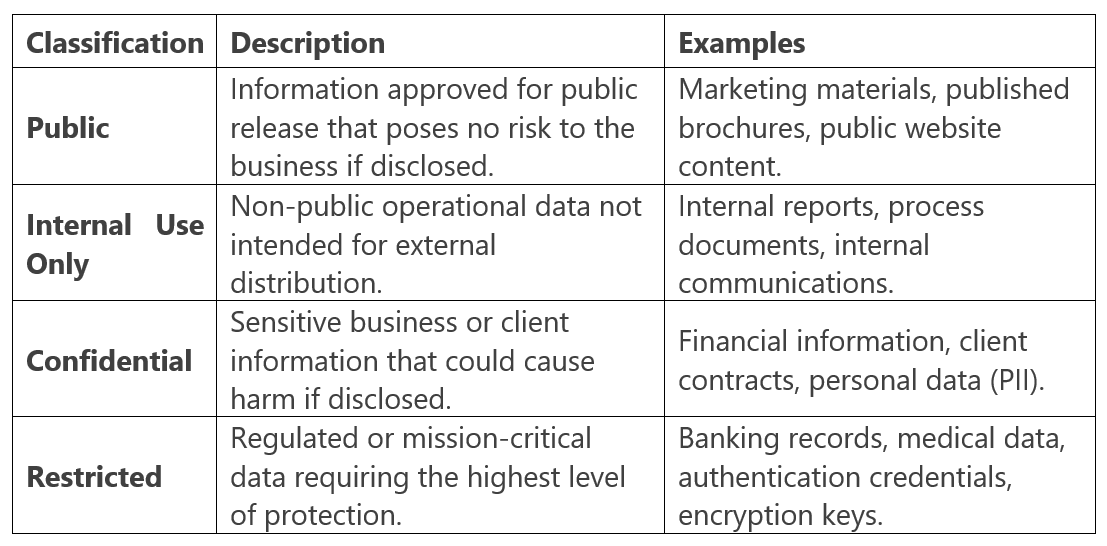
Þ Data classified as Confidential or Restricted must be encrypted both in transit (TLS 1.2 or higher) and at rest using approved encryption methods.
Þ Access to Confidential and Restricted data must be limited to authorized personnel only, based on the principle of least privilege.
Þ Restricted data must require Multi-Factor Authentication (MFA) for access and must not be stored or transmitted through unapproved platforms or personal accounts.
Þ Confidential or Restricted data must not be copied, transferred, or stored on removable media (USB drives, external hard drives, etc.) unless encrypted and approved by Us.
Þ Third-party vendors or partners handling Confidential or Restricted data must maintain equivalent security protections and sign appropriate confidentiality or data processing agreements.
Þ When data is no longer needed, it must be securely deleted or destroyed in accordance with industry standards for data sanitization.
Compliance and Oversight
Þ We reserve the right to audit the classification and protection of data stored on Your IT Network to ensure compliance with this Policy.
Þ All employees, contractors, and partners must review and acknowledge this Policy before being granted access to systems containing Confidential or Restricted data.
ARTIFICIAL INTELLIGENCE (AI) & DATA PRIVACY POLICY
Artificial Intelligence (“AI”) tools and automation platforms can greatly enhance productivity; however, they also introduce significant risks related to privacy, confidentiality, and data ownership. To protect Your IT Network and corporate data, this Policy establishes the requirements for the responsible and secure use of AI systems by all personnel, contractors, and third parties.
General AI Use Requirements
Þ All use of AI platforms, applications, or tools (including, but not limited to, ChatGPT, Microsoft Copilot, Google Gemini, and similar technologies) that process, analyze, or generate company-related data must be pre-approved by management and configured in accordance with Our security and privacy standards.
Þ Users are prohibited from entering, uploading, or referencing any Confidential or Restricted information into public or unapproved AI systems. This includes client data, financial information, proprietary code, credentials, or any non- public business information.
Þ Only Dependable Solutions–approved AI systems integrated into Our Standard Technology Suite may be used for official business purposes.
Þ All AI-generated content must be reviewed by the responsible employee and/or supervisor for accuracy, compliance, and ethical considerations before being distributed, published, or relied upon.
Þ Personnel must ensure that any AI system used complies with applicable data privacy, intellectual property, and information security regulations.
Data Privacy & Protection
Þ AI systems processing company data must use secure transmission methods and meet or exceed industry encryption standards (TLS 1.2 or higher for data in transit; AES-256 or equivalent for data at rest).
Þ Data collected, analyzed, or generated by AI systems must be handled in accordance with the Data Classification & Handling Policy.
Þ Where AI tools interface with third-party vendors or cloud services, those vendors must maintain appropriate privacy safeguards, contractual confidentiality obligations, and comply with applicable data protection laws.
Þ Personal data (including names, addresses, phone numbers, Social Security numbers, payment information, or health data) must not be shared with or processed by AI systems unless expressly authorized and compliant with applicable laws such as HIPAA, GLBA, FERPA, or CCPA/CPRA.
Þ Any suspected or confirmed unauthorized disclosure of information resulting from AI use must be immediately reported in accordance with the Security Incident Reporting & Response Policy.
Prohibited Activities
Þ Using AI tools to generate, transmit, or store sensitive or proprietary data in violation of this Policy,
Þ Allowing unapproved AI plugins, extensions, or browser add-ons to access or analyze company e-mail, chat, or file storage systems.
Þ Using AI to impersonate individuals, create falsified communications, or engage in deceptive or unethical practices.
Þ Employing AI for automated decision-making that affects employees, clients, or partners without human review and management authorization.
VENDOR & THIRD-PARTY RISK MANAGEMENT POLICY
Vendors, contractors, and other third-party service providers who access, store, transmit, or process Your company’s data or have access to Your IT Network present potential risks to confidentiality, integrity, and availability of systems and information. This Policy outlines the requirements to ensure that all external parties maintain security and privacy standards consistent with those of Your organization and Dependable Solutions.
Vendor Selection & Approval
Þ All vendors and third-party service providers with access to company data, systems, or facilities must undergo a formal vetting and approval process before engagement.
Þ Vendors must demonstrate the ability to comply with all applicable cybersecurity, privacy, and data-protection standards relevant to their services (e.g., NIST, CIS Controls, ISO 27001, SOC 2, HIPAA, GLBA, CMMC).
Þ A written contract or service agreement must exist for every third-party engagement, outlining security, confidentiality, data-handling, and breach- notification obligations.
Þ Vendors must agree to follow the same security controls and incident-response procedures required of internal personnel under this Policy Manual.
Ongoing Monitoring & Oversight
Þ Vendors’ security practices must be reviewed at least annually or upon any material change in their services, ownership, or risk profile.
Þ Vendors must immediately notify Dependable Solutions and Your organization of any suspected or confirmed cybersecurity incident or data breach affecting company or client data.
Þ All vendor systems with remote or administrative access to Your IT Network must use Multi-Factor Authentication (MFA) and secure connection methods such as VPN or equivalent encrypted channels.
Þ Access by vendors must follow the principle of least privilege and be restricted to only those systems and data necessary to perform contracted services.
Þ Vendor accounts must be disabled or removed immediately upon contract termination or completion of work.
Data Protection Requirements
Þ Vendors that store, process, or transmit Confidential or Restricted data must ensure encryption in transit (TLS 1.2 or higher) and at rest (AES-256 or equivalent).
Þ Third-party cloud or SaaS providers must maintain continuous security monitoring and log retention sufficient to support incident detection and investigation.
Þ Vendors are prohibited from transferring company or client data to unapproved subcontractors or locations without prior written authorization.
Þ Where vendors process personal information subject to privacy laws (e.g., CCPA/CPRA, HIPAA, GLBA, FERPA), they must implement required administrative, technical, and physical safeguards.
Compliance & Enforcement
Þ Vendors must provide evidence of cybersecurity insurance coverage and attestations of compliance upon request.
Þ Failure to comply with these requirements may result in suspension of access, contract termination, and notification of regulatory authorities or affected clients as required by law.
Þ All vendor and third-party relationships are subject to audit by Dependable Solutions or its designated representatives to verify adherence to this Policy.
PATCH MANAGEMENT & VULNERABILITY CONTROL POLICY
Keeping software, firmware, and operating systems up to date is essential to maintaining the security and stability of Your IT Network. Failure to apply timely patches and security updates can expose systems to exploitation, resulting in data breaches, malware infections, and significant operational disruptions. This Policy establishes the standards and procedures for managing software vulnerabilities and applying patches across all systems within Your environment.
Patch Management Responsibilities
Þ Dependable Solutions is responsible for monitoring, evaluating, testing, and applying security updates, patches, and firmware upgrades to all managed devices, servers, workstations, firewalls, and network appliances under Our support.
Þ We use automated patch management tools from Our Standard Technology Suite to identify missing updates and deploy them in a controlled, consistent, and verifiable manner.
Þ All software vendors, including operating system and application providers, are expected to issue patches and updates according to their own release schedules. We will review these updates as they become available and determine their applicability and timing for deployment.
Þ All systems must be maintained at a level that ensures vendor support and the ability to receive current security patches. Systems or applications that are no longer supported by the manufacturer must be isolated, upgraded, or decommissioned.
Patch Deployment Standards
Þ Critical and high-severity patches addressing actively exploited vulnerabilities must be deployed within a commercially reasonable timeframe—generally within 7 days of release or notification, unless a shorter timeframe is required by law or contract.
Þ Moderate or low-severity patches should be deployed within 30 days of release.
Þ Patches should be tested in a controlled environment prior to deployment to ensure system stability and compatibility.
Þ Where patches cannot be applied due to operational or compatibility constraints, appropriate compensating controls (such as network segmentation, access restriction, or intrusion prevention) must be implemented until the vulnerability can be remediated.
Þ All patching activity must be logged and verified through regular reporting to confirm successful deployment and compliance.
Vulnerability Management & Remediation
Þ Dependable Solutions will conduct periodic vulnerability scans to identify known weaknesses in operating systems, applications, and network devices.
Þ Identified vulnerabilities will be prioritized for remediation based on severity, exposure, and potential business impact.
Þ Findings from vulnerability assessments will be reviewed with management and incorporated into ongoing patch management and risk mitigation efforts.
Þ In the event that an exploit or “zero-day” vulnerability is discovered, Dependable Solutions may take immediate protective measures, including isolating affected systems, blocking specific network traffic, or applying emergency updates.
Reporting & Compliance
Þ All devices under management must comply with this Policy and maintain an approved patch level to access Your IT Network.
Þ Devices found to be out of compliance may be restricted from network access until remediated.
Þ Dependable Solutions will maintain documentation of all patch management activities and vulnerability remediation efforts for audit and compliance purposes.
Þ All incidents or concerns related to unpatched systems or identified vulnerabilities must be reported in accordance with the Security Incident Reporting & Response Policy.
BACKUP & DISASTER RECOVERY POLICY
System backups and disaster recovery procedures are essential to protecting Your IT Network and ensuring the continued operation of Your business. This Policy defines the standards for data backup, recovery, and business continuity to minimize downtime and data loss in the event of hardware failure, cyberattack, or other catastrophic events.
Backup Management & Responsibilities
Þ Dependable Solutions is responsible for implementing and maintaining data backup systems for all servers, workstations, and cloud resources under Our management, as defined in Your Managed Services Agreement (MSA).
Þ All critical business data must be backed up regularly to both onsite and offsite (or cloud-based) storage locations approved by Us.
Þ Backups must be encrypted both in transit (TLS 1.2 or higher) and at rest (AES- 256 or equivalent) to prevent unauthorized access.
Þ We will maintain and test backup schedules, storage retention policies, and restoration processes to ensure compliance with data protection and business continuity requirements.
Þ Backup copies must be protected against accidental deletion, overwriting, or unauthorized modification.
Backup Frequency & Retention
Þ Incremental or differential backups of critical data must occur at least daily, while full system backups must occur at least weekly or as defined in Your MSA.
Þ Backup data must be retained according to the following general standards unless otherwise specified by regulatory, contractual, or business requirements:
• Daily backups – retained for a minimum of 7 days.
• Weekly backups – retained for a minimum of 4 weeks.
• Monthly backups – retained for a minimum of 6 months.
Þ Data requiring longer retention for compliance (such as financial records, audit logs, or regulated data) will be maintained according to the applicable legal requirements.
Þ All backup media must be clearly labeled, tracked, and stored in secure, access- controlled environments.
Disaster Recovery & Restoration
Þ In the event of a data loss, ransomware attack, or system failure, Dependable Solutions will initiate data restoration procedures according to the severity and scope of the incident.
Þ All restoration activities will be prioritized based on business criticality and service-level agreements.
Þ Disaster recovery procedures must include validation of restored data integrity, documentation of all actions taken, and post-restoration verification of system functionality.
Þ Periodic disaster recovery tests will be performed to confirm that recovery objectives can be met within established Recovery Time Objectives (RTOs) and Recovery Point Objectives (RPOs).
Þ If backup integrity is found to be compromised, We will immediately take corrective action and notify You of any data at risk.
Cloud & Offsite Backup Requirements
Þ Cloud-based backup systems must be hosted with reputable providers that meet industry security and compliance standards, such as SOC 2 Type II or ISO 27001 certification.
Þ All data transmitted to or stored in cloud backup systems must be encrypted and protected with Multi-Factor Authentication (MFA) for administrative access.
Þ Access to offsite or cloud backups must be limited to authorized Dependable Solutions personnel with a legitimate business need.
Þ Backup systems must maintain detailed logging and monitoring to detect any unauthorized access attempts or data corruption.
Compliance & Reporting
Þ Dependable Solutions will maintain written documentation of all backup configurations, schedules, test results, and recovery procedures.
Þ All backup and recovery activities are subject to audit and must comply with applicable data retention laws and regulations (such as HIPAA, GLBA, or state privacy statutes).
Þ Any failure of a backup job, data corruption event, or other anomaly must be investigated and reported in accordance with the Security Incident Reporting & Response Policy.
REMOTE WORK & TELECOMMUTING POLICY
The ability to work remotely or from home offers flexibility and increased productivity, but it also introduces additional security risks that must be carefully managed. This Policy establishes the standards for secure remote access, data protection, and acceptable use for employees and contractors working outside of Your company’s physical offices.
General Requirements
Þ All remote work must be approved by management and performed in compliance with this Policy, the Password Policy, and the Security Incident Reporting & Response Policy.
Þ Remote workers must ensure that their work environment provides appropriate levels of privacy, physical security, and reliable Internet connectivity.
Þ Access to Your IT Network from remote locations must occur through secure, Dependable Solutions–approved methods such as Virtual Private Network (VPN) or other encrypted remote-access technologies.
Þ Multi-Factor Authentication (MFA) must be used for all remote connections to company systems, e-mail, and cloud services.
Þ All devices used for remote work must have up-to-date endpoint protection (EDR/NGAV) and receive regular security patches and updates.
Equipment & Device Security
Þ Company-owned equipment must be used for remote work whenever possible.
Þ Personal devices used for remote access must comply with the Personal Device (“BYOD”) Policy and may be subject to security configuration, monitoring, and management.
Þ Remote users must not store Confidential or Restricted data locally on personal devices, removable media, or unapproved cloud services.
Þ All remote devices must be configured to automatically lock after a period of inactivity and require password or biometric authentication to unlock.
Þ Portable devices (such as laptops or tablets) must employ full-disk encryption to protect data at rest.
Þ Remote workers must ensure that home or offsite Wi-Fi networks use WPA2 or WPA3 encryption, with strong, unique passwords and no default credentials.
Data Handling & Communication
Þ All data transmitted between remote devices and Your IT Network must be encrypted using TLS 1.2 or higher.
Þ Remote users must access company data only through approved systems and applications.
Þ Use of personal e-mail accounts, messaging platforms, or file-sharing services for company business is strictly prohibited.
Þ Sensitive discussions or meetings involving Confidential or Restricted information must be conducted using approved, secure conferencing tools.
Þ Documents containing sensitive data must not be printed at home or in uncontrolled environments without prior authorization.
Monitoring & Compliance
Þ Dependable Solutions reserves the right to monitor, log, and audit remote connections and user activity on Your IT Network for security and compliance purposes.
Þ Failure to comply with this Policy may result in suspension of remote access privileges and potential disciplinary or contractual actions.
Þ Remote workers must immediately report any security incidents, lost devices, or suspected data exposure in accordance with the Security Incident Reporting & Response Policy.
Þ Dependable Solutions may restrict or disable remote access temporarily during security events, maintenance, or system upgrades.
Business Continuity & Support
Þ In the event of an outage, disaster, or widespread disruption, Dependable Solutions will activate remote-access contingency plans to maintain critical business operations.
Þ Remote employees are expected to follow all business continuity procedures, including backup access instructions, alternate communication channels, and emergency contact requirements.
Þ Technical support for remote users will be provided in accordance with Your Managed Services Agreement (MSA), subject to the same security verification and monitoring standards as onsite support.
Policy Revision History

601 7th St N,
115 E Blackhawk Ave
708 Heartland Trail,
© Copyright 2026 Dependable Solutions. Built with MSP Sites | Privacy Policy | IT Policy | Areas We Serve
Areas We Serve

